
Lumina Match · Browser game
Lumina Match
Free online memory card game · 250 levels
Lumina Match is a free online memory game inside MatchApp Ai. Turn over illustrated cards, remember their positions and match every pair to open the next level.
Play a quiet solo session, try an optional timed challenge or share a classic round with friends. The game runs in your desktop, phone or tablet browser without installing a game.
Go to Home to playOn Home, choose the Play Lumina Match pill to open the game.
Updated · MatchApp Ai
How to play the card matching game
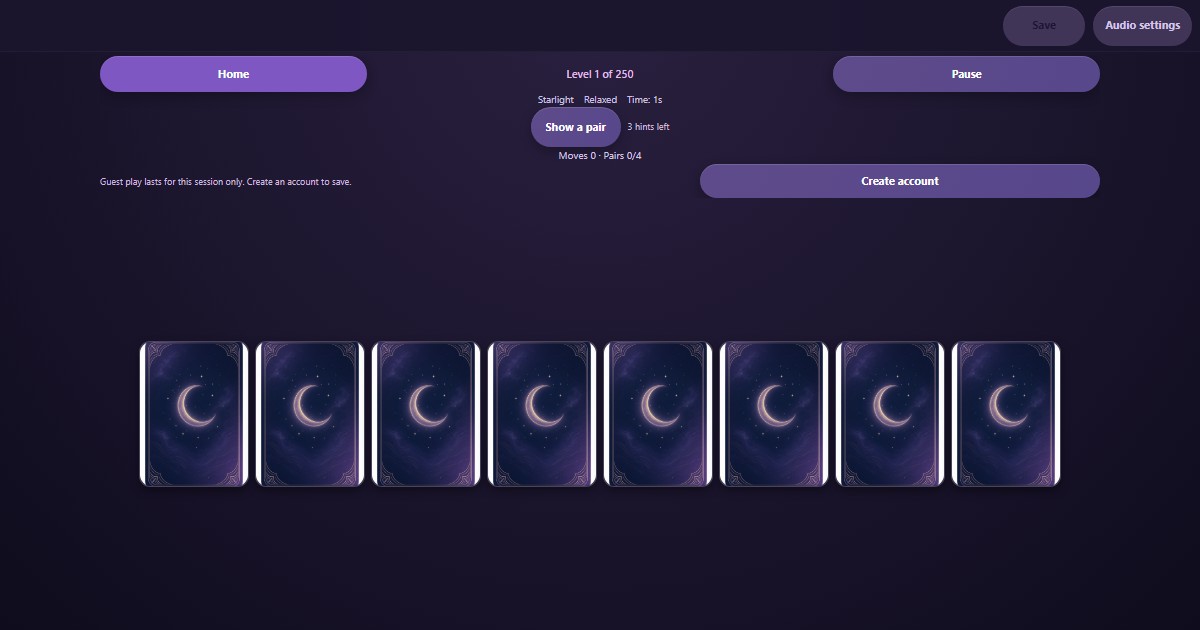
Each turn reveals two cards. Matching cards stay visible; different cards turn back over. Use what you remember on your next turn.
New to matching pairs? Open the Beginner’s Guide from the game menu for a short interactive practice round. It does not change your campaign progress.
- Open Lumina Match from Home and choose a campaign level.
- Choose Relaxed for no countdown, or Timed challenge to play against the clock.
- Clear every pair to unlock the next level. Replay completed levels whenever you want.
A 250-level journey through three themes
The solo campaign has ten chapters of 25 levels. Starlight boards grow as you progress. Enchanted Grove appears every 20 levels and Celestial Ocean every 25; Grove takes priority at levels 100 and 200.
Earn up to three stars with fewer moves, with 750 stars to collect. Each attempt offers three hints that briefly reveal a pair; using a hint limits that result to two stars. Every first clear of a tenth level adds 50 milestone points.
Solo levels and classic rounds with friends
Relaxed and timed campaign play unlock the same levels. Classic rounds offer a smaller board for solo play or two players taking turns on one device.
For online friend rounds, sign in and invite an existing, mutually accepted Match Together friend. The friend accepts before the shared round starts. These classic friend rounds are separate from your solo 250-level campaign.
Save your journey, then return to MatchApp
Registered players save unlocked levels, stars and unfinished solo games to their MatchApp account. Use Save in the game and check the save status before leaving.
Guest progress lasts only while the game stays open. Guest Save opens an account prompt: create an account, keep playing or close without saving. Close returns you to Home; closing or reloading a guest game loses that session's progress.
Set the sound for your session
Theme music and card sounds begin after your first game interaction. Audio settings let you switch music and sound effects separately and adjust the volume.
Pause when you need a break. Audio stops while the game is paused or hidden, and Close stops the game audio when you return to Home.
Matching pairs, Concentration and match-3: what is different?
Lumina Match follows the face-down pairs format often called Concentration: reveal two cards, remember the pictures and find the identical pair. The board is a grid of cards, not a path-building or tile-sliding puzzle. You do not swap gems or line up three objects.
The familiar tabletop card-game idea becomes a browser puzzle with illustrated themes and a level campaign. No download is needed to try the browser edition. Guests can play immediately, but saving across visits requires a MatchApp account; no sign-up does not mean permanent guest saves.
How to match pairs with fewer moves
Start in Relaxed mode when learning a board. Scan one row at a time and give each picture a location, such as “moon, top left.” When the first card reveals a picture you have seen, choose its known partner rather than opening another unknown card. A mismatch still gives you information for a later turn.
Use the practice guide to learn the controls, then replay a completed level to compare your moves. Hints reveal a pair but limit that attempt to two stars, so save them for a genuinely uncertain position. Timed mode adds a countdown; it does not change the goal of clearing every pair. These are playing tips, not a promise of medical or cognitive benefits.
Questions about Lumina Match
How do I start playing?
Go to MatchApp Home, choose Play Lumina Match and open a level. Match all pairs to move forward; Relaxed has no countdown.
Is the game free, and does it have ads?
Lumina Match is free to play. There are currently no ads inside the game and no videos to watch to continue playing.
Do I need an account to save?
Yes. Registered accounts retain progress. Guests can play without registering, but their game progress is not stored in the browser and is lost when the game closes or reloads.
Can I play with friends?
Yes: take turns on one device or sign in for online classic rounds with accepted Match Together friends. The campaign remains a solo mode.
Why is there no sound yet?
Tap a game control first, then check Audio settings and your device volume. You can also play with music and sound effects turned off.
Which devices and languages are supported?
Use a desktop, phone or tablet web browser. The game supports all 14 MatchApp interface languages. This browser edition is not available inside the native Android app or Kids Mode.